CygNet CAS View Control – Configuring Color Properties
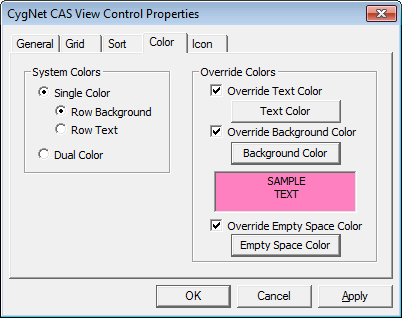
The settings on the Color page specify the colors of the grid, row background, and text information displayed in the CAS View Control.
|
CAS View Control Color Properties |
| Option | Description |
|---|---|
|
System Colors |
|
|
Single Color |
Specifies whether alarm point state colors are displayed in Single Color mode (in either the Row Background or Row Text). Alarm point state colors are defined by the Point Scheme. See Displaying Alarm Information for the point state colors for the CygNet Standard Point Scheme. |
|
Dual Color |
Specifies whether alarm point state colors are displayed in Dual Color mode. |
| Override Row Colors | |
|
Override Text Color |
Enable to override the default system text color. Click Text Color to select the override color. |
|
Override Background Color |
Enable to override the default system background color. Click Background Color to select the override color. |
|
Override Empty Space Color |
Enable to override the empty space color. Click Empty Space Color to select the override color. The empty space is the area to the right and below the CAS View Control grid. |

